Allure for Compose Multiplatform
ultron-allure reports Ultron operations as steps, attaches screenshots and semantics trees on failure, and includes the test log. Video is optional. It supports desktop, iOS, macOS, JS and Wasm. Android instrumented tests use the Android setup.
Allure for Compose Multiplatform is available since Ultron 2.7.0. Use ultron-compose and ultron-allure 2.7.0 or later; earlier versions report Android instrumented tests only. Inside the Ultron repository itself, depend on project(":ultron-allure").
Supported targets
| Target | Reporting | Results land in | host label |
|---|---|---|---|
| Desktop (JVM) | Enabled by default | A directory on disk, see Results directory | desktop |
| iOS simulator | Enabled by default | A directory on disk, forwarded to the host with SIMCTL_CHILD_ULTRON_ALLURE_RESULTS_DIR | ios |
| macOS | Enabled by default | A directory on disk | macosx |
| js, wasmJs (browser via Karma; under Node.js only the result writer, without Compose UI) | Enabled by default, in memory: no file is ever written, results are dumped to the console and collected on the host | UltronAllureResults in the page | web |
| Android | Reported through the allure-kotlin pipeline of the same module, see Allure (Android) | <app files dir>/allure-results on the device, pulled with adb | the host name allure-kotlin reads on the device |
Every target that renders through Skiko (desktop, iOS, macOS, js, wasmJs) supports all features of the module, including screenshots and the video. Tests on a physical iOS device are not covered by this page: there is no recipe yet to bring their results to the host. The host label is what the report shows under Host in the test overview, and it is the quickest way to tell which platform a result came from when several platforms write into one results directory. It does not keep the results of the same test apart: the target parameter and the historyId do, see Labels.
Quick start
Start with a module that already runs Compose Multiplatform UI tests. For a module that also targets Android, use the shared configuration recipe.
Add the dependency
// build.gradle.kts
kotlin {
    sourceSets {
        commonTest.dependencies {
            implementation("com.atiurin:ultron-compose:2.7.0") // 2.7.0 or later
            implementation("com.atiurin:ultron-allure:2.7.0")
        }
    }
}
Configure reporting and write a test
// commonTest/kotlin/LoginTest.kt
import androidx.compose.ui.test.ExperimentalTestApi
import androidx.compose.ui.test.hasTestTag
import com.atiurin.ultron.allure.config.UltronAllureConfig
import com.atiurin.ultron.annotations.ExperimentalUltronApi
import com.atiurin.ultron.core.compose.runUltronUiTest
import com.atiurin.ultron.core.test.UltronTest
import com.atiurin.ultron.extensions.assertIsDisplayed
import kotlin.test.Test

@OptIn(ExperimentalTestApi::class, ExperimentalUltronApi::class)
class LoginTest : UltronTest() {
    // Runs once, before the first test of the class.
    override val beforeFirstTest = { UltronAllureConfig.applyRecommended() }

    @Test
    fun loginIsVisible() = test(name = "login is visible") {
        go {
            runUltronUiTest {
                setContent { App() } // Your application composable.
                hasTestTag("login").assertIsDisplayed()
            }
        }
    }
}
Write the test function with = so it returns test { }: on JS/Wasm that is a promise the runner awaits, and test { } waits for the runUltronUiTest inside it. The same code runs on every target. test(name = ...) names the result and groups it under the class in the report. Write tests with UltronTest adds before { } and after { }; Without UltronTest shows the plain runUltronUiTest form.
Open the first desktop report
// build.gradle.kts
tasks.named<Test>("desktopTest") {
    val results = layout.buildDirectory.dir("allure-results/desktop")
    environment("ULTRON_ALLURE_RESULTS_DIR", results.get().asFile.absolutePath)
    outputs.dir(results)
}
brew install allure
./gradlew :app:desktopTest
allure generate app/build/allure-results/desktop --clean -o build/allure-report
allure open build/allure-report
Replace app with your module name. For iOS, macOS, browsers and Android, use the result collection recipes in From results to a report.
The report on each target
The same scenario, written once against the composeApp demo app (ContactsScreen in composeApp/src/commonTest), as Allure shows it on every platform. Element names come from withName(...), which is why the step titles read the same everywhere.
- Desktop
- iOS
- wasmJs
- Android
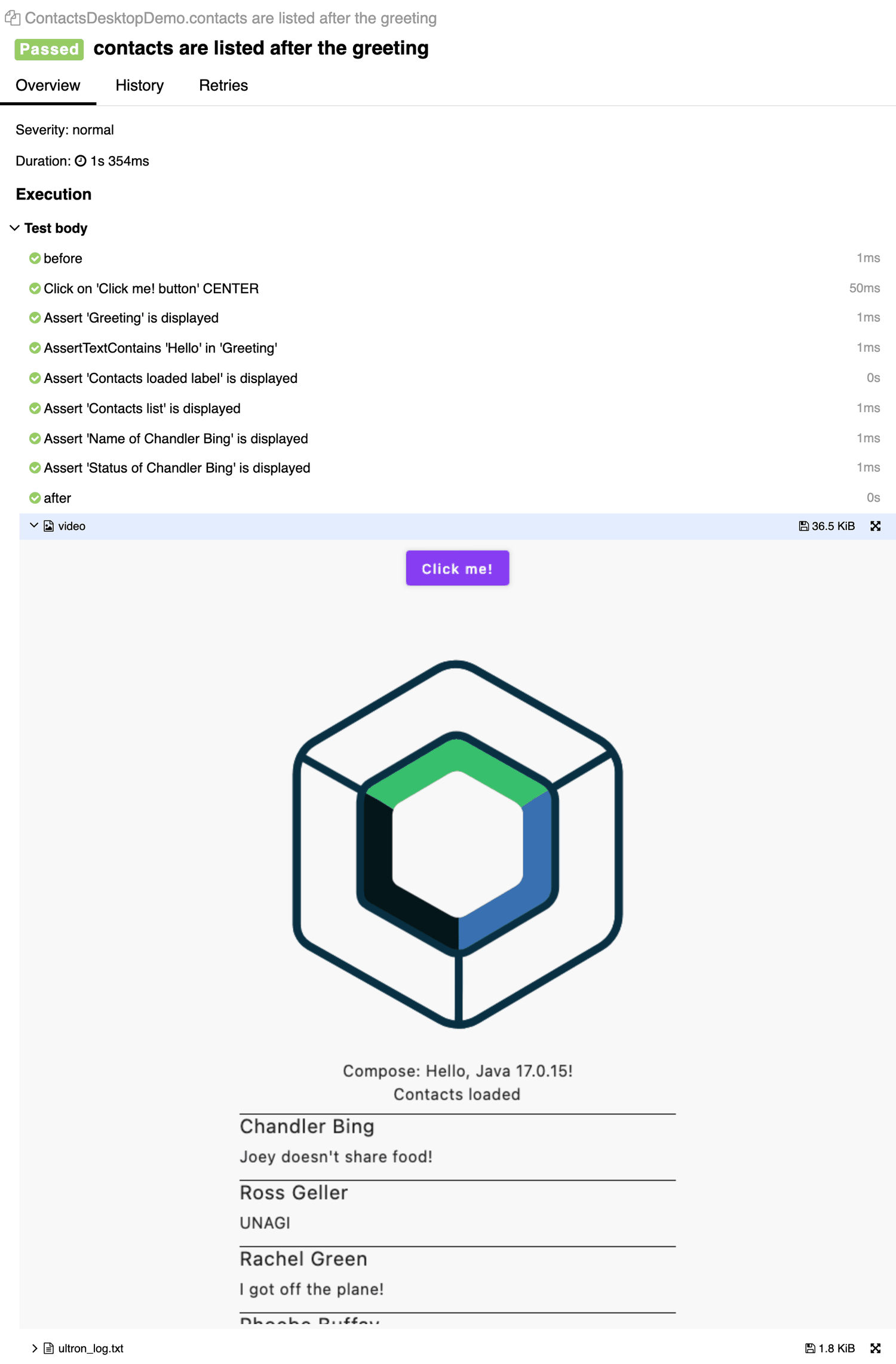
An UltronTest on the JVM: before and after are steps, the class is the suite, and the video attachment is the frame-by-frame video of the whole test, opened inline: an H.264 video/mp4 by default (an animated PNG with videoFormat = APNG, or when the encoder fails). The scene is the 480×800 surface given to runDesktopUltronUiTest.
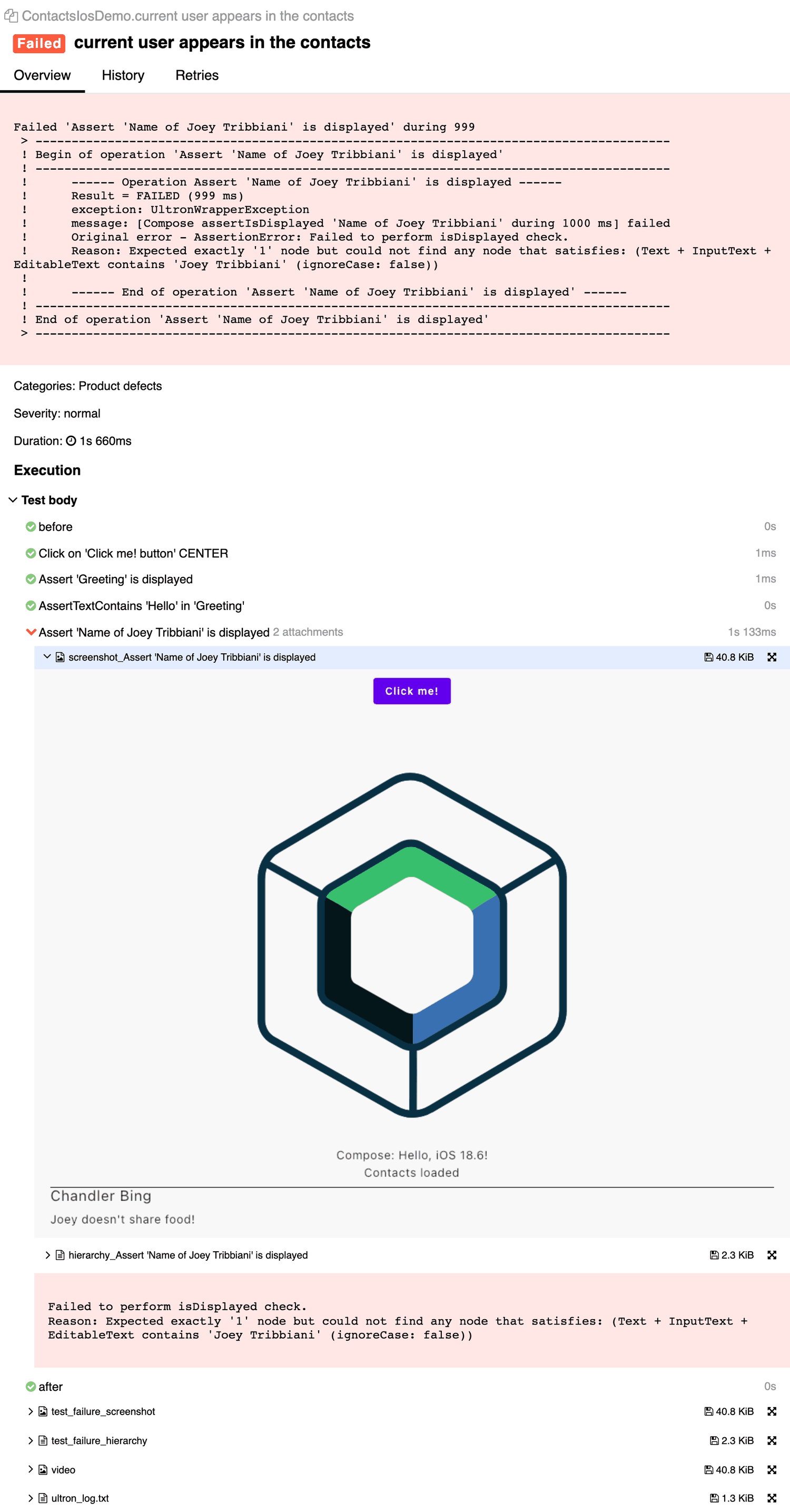
The same UltronTest on the iOS simulator, in its failing variant. The failed operation carries its own screenshot_… and hierarchy_… attachments, the test carries test_failure_screenshot, test_failure_hierarchy, the video and the Ultron log; the message of the failed operation is at the top. Results reached the host through SIMCTL_CHILD_ULTRON_ALLURE_RESULTS_DIR (see iOS simulator).
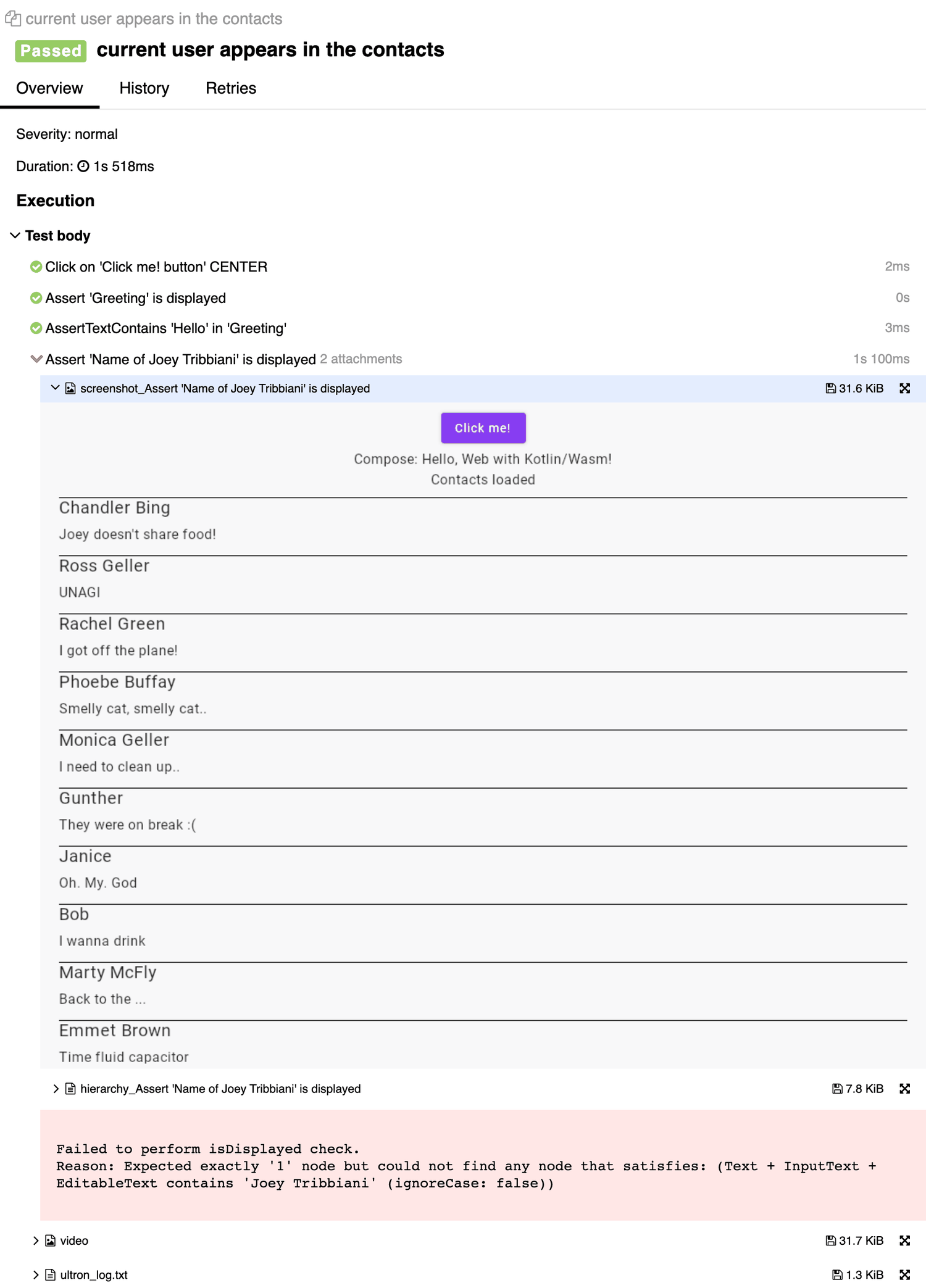
The browser target, here in the plain form named with runUltronUiTest("…") (an UltronTest looks as on desktop): the failing operation is caught inside the test body, so the test is passed while the step is failed and still carries the screenshot and the semantics tree. The result never touched a file system: it was collected from the Karma console by the Gradle task described in Browsers.
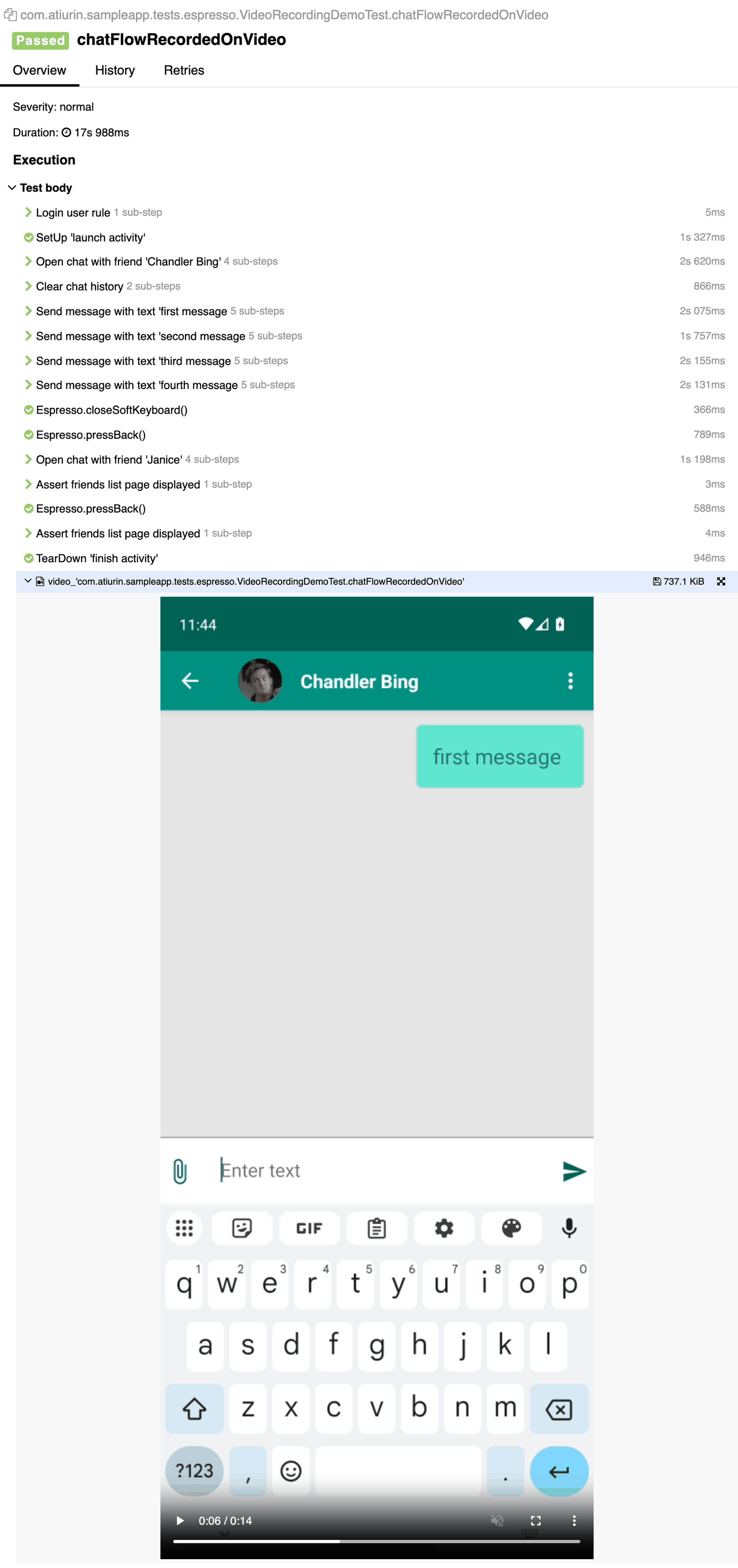
Android instrumented tests go through the allure-kotlin pipeline of the same module (see Allure (Android)): Espresso steps with sub-steps, and the mp4 recorded by screenrecord plays inline.
Write tests
Write tests with UltronTest
The recommended way is to write tests as subclasses of UltronTest: its lifecycle is what the Allure module follows, and it gives you everything in one place, on every target:
beforeFirstTestruns once per class and is whereUltronAllureConfigis applied; no extra object, runner or JUnit rule is needed.test(name = "...")opens the Allure test and names it. The name works on every platform, including iOS and macOS where nothing can be discovered from the stack, and it groups the result under the class in the Suites tree.- Every result has steps named
beforeandafter, one for each block, empty when the block is not set;go { }holds therunUltronUiTestblock, whose Ultron operations are the top-level steps. - The result is written when
test { }finishes (in the browser: when the promise it returns settles), so a failure anywhere, including inafter { }, fails the test.
Write the test function with =, fun login() = test { ... }, as in the examples. A block body, fun login() { test { ... } }, drops the promise that test { } returns on js/wasmJs, and the browser runner moves on before the UI code has run. Call runUltronUiTest once per block.
// commonTest/kotlin/LoginTest.kt
import androidx.compose.ui.test.ExperimentalTestApi
import androidx.compose.ui.test.hasTestTag
import com.atiurin.ultron.annotations.ExperimentalUltronApi
import com.atiurin.ultron.core.compose.runUltronUiTest
import com.atiurin.ultron.core.test.UltronTest
import com.atiurin.ultron.extensions.assertIsDisplayed
import com.atiurin.ultron.extensions.click
import kotlin.test.Test

@OptIn(ExperimentalTestApi::class, ExperimentalUltronApi::class)
class LoginTest : UltronTest() {
    // configureAllure() is the expect/actual from "What common test code can see". In a module without an
    // Android target the body can be written here directly:
    //   UltronAllureConfig.apply { videoPolicy = mutableSetOf(AllureAttachStrategy.TEST_FAILURE) }
    override val beforeFirstTest = { configureAllure() }

    // before { } and after { } are optional; test(name) { go { ... } } is enough. The report has a "before" and an
    // "after" step either way, empty when the block is not set. FakeAuthServer stands for your own test fixture.
    @Test
    fun loginShowsError() = test(name = "login with wrong password shows an error") {
        before {
            // optional: prepare the test data, e.g. a fake backend that rejects the login
            FakeAuthServer.rejectEveryLogin()
        }.go {
            runUltronUiTest {
                setContent { App() }
                hasTestTag("login").click()
                hasTestTag("error").assertIsDisplayed()
            }
        }.after {
            // optional: clean up
            FakeAuthServer.reset()
        }
    }
}
For a parameterized test keep one name and add the values as parameters with UltronAllure.parameter("user", user) inside the block (Skiko targets only: it does not compile in the commonTest of a module with an Android target), so its invocations are reported apart under one test case; see Labels. For naming and lifecycle rules, see UltronTest lifecycle in the reference.
Without UltronTest
Plain runUltronUiTest tests are reported too. Use this form when there is a reason not to subclass UltronTest: an existing suite of plain runUltronUiTest tests you do not want to rewrite, or tests that live in a class hierarchy of their own. It works on every target as well; on js/wasmJs return runUltronUiTest from the test function, as below.
Two things then have to be done by hand. First, UltronAllureConfig must be applied once per test process before the first runUltronUiTest. kotlin.test has no @BeforeClass on every target, so the portable "run once" is an object whose initialiser applies the config, touched from each test class. The configuration itself is the configureAllure() of What common test code can see (in a module without an Android target, UltronAllureConfig.apply { videoPolicy = ... } can stand in the init directly):
// commonTest/kotlin/AllureTestSetup.kt
object AllureTestSetup {
    init {
        configureAllure()
    }

    fun ensure() = Unit
}
Second, the test boundary is the runUltronUiTest block itself, so the name has to be passed to it; otherwise it is discovered on the JVM only (see Test names and boundaries):
// commonTest/kotlin/LoginTest.kt
@OptIn(ExperimentalTestApi::class)
class LoginTest {
    @BeforeTest
    fun allure() = AllureTestSetup.ensure()

    @Test
    fun loginShowsError() = runUltronUiTest("login shows error") {
        setContent { App() }
        hasTestTag("login").click()
        hasTestTag("error").assertIsDisplayed()
    }
}
There is still no instrumentation runner to set and no JUnit rule to add, and the steps are the Ultron operations executed inside the block. What you lose compared to UltronTest is the class grouping on Native and in the browser without the name adapter, the before/after steps and the common beforeTest/afterTest hooks.
Use the sample project as a reference: the UltronTest samples AllureUltronTestDesktopTest.kt and AllureResultsIosTest.kt, the plain-form setup AllureTestSetup.kt with AllureResultsDesktopTest.kt, and the browser test AllureResultsWasmTest.kt.
Modules with an Android target
What common test code can see
UltronAllureConfig is one expect object with an actual for Android and one for the Skiko targets (desktop, iOS, macOS, js, wasmJs). Only params, applyRecommended(), apply { } and the parameters addScreenshotPolicy, addHierarchyPolicy, attachUltronLog and detailedAllureReport are common; everything else, video and the results directory included, exists on one side only (see the side-by-side table).
Which of them commonTest compiles against depends on the targets of your module, because Kotlin resolves a library's source sets against the consumer's target set:
- No Android target (desktop, iOS, macOS, js, wasmJs in any combination): every target of the module is a Skiko one, so
commonTestsees the SkikoactualwithvideoPolicy,resultsDirectoryandUltronAllure, and the examples on this page compile as written. - An Android target as well:
commonTestsees only the four common parameters;videoPolicyand the other Skiko-only members do not compile there. And at runtime the AndroidapplyRecommended()/apply { }registers run listeners through the instrumentation, which requiresUltronAllureTestRunner: called from a plain Android unit test, or from an instrumented test without that runner, it throws. So the configuration goes into a platform-specificactual, shared by the Skiko targets through an intermediate source set, with a no-op (or an Android-specific)actualfor Android:
// build.gradle.kts: one test source set for every Skiko target, one for Android
kotlin {
    applyDefaultHierarchyTemplate {
        common {
            group("skiko") { withJvm(); withNative(); withJs(); withWasmJs() } // skikoMain / skikoTest
            group("androidShared") { withAndroidTarget() }                    // androidSharedTest: unit + instrumented
        }
    }
    // targets as usual
}
// commonTest/kotlin/AllureSetup.kt
internal expect fun configureAllure()

// skikoTest/kotlin/AllureSetup.skiko.kt
import com.atiurin.ultron.allure.config.AllureAttachStrategy
import com.atiurin.ultron.allure.config.UltronAllureConfig

internal actual fun configureAllure() {
    UltronAllureConfig.apply {
        videoPolicy = mutableSetOf(AllureAttachStrategy.TEST_FAILURE) // Skiko-only members are visible here
    }
}

// androidSharedTest/kotlin/AllureSetup.android.kt
// Android instrumented tests configure Allure in @BeforeClass with UltronAllureTestRunner (see the Android page);
// nothing to do from the shared setup, which Android unit tests reach as well.
internal actual fun configureAllure() = Unit
Code that calls UltronAllure.captureVideoFrame(...) or UltronAllure.lifecycle.attach(...) belongs in the same skikoTest source set, or behind an expect of your own, for the same reason. The composeApp sample is laid out like this (build.gradle.kts, AllureTestSetup.kt with its Skiko and Android actuals).
From results to a report
Ultron writes Allure 2 result files (<uuid>-result.json plus <uuid>-attachment.<ext>); the HTML report is built from them on the host by the Allure command line, after the test task has finished. This section is the end-to-end recipe for a project of your own. app below stands for the Gradle module that holds your Compose Multiplatform tests; replace it with yours.
In short:
- Install the Allure command line once.
- Make sure each target you run puts its results on the host: desktop and macOS write to the host directly (give each its own directory on the test task), iOS needs one environment variable on the test task, browsers need a Karma option and a small Gradle task, Android needs
adb pull. - Run the tests, then generate the report from the results directories, one platform or all of them at once.
Install the Allure command line
Follow the Allure Report install guide, or:
brew install allure                               # macOS
# or, without installing anything: npx allure-commandline@2.32.0 <command>
Results directory
On desktop, iOS and macOS the results directory is resolved in this order and logged as Allure results go to <path> when the first test after an applyRecommended() / apply { } starts (once per configuration, so once per process in the usual setup):
UltronAllureConfig.params.resultsDirectory- the
ULTRON_ALLURE_RESULTS_DIRenvironment variable build/allure-resultsrelative to the working directory of the test process
The directory is never cleaned by Ultron: results of previous runs stay there until you delete them, so clean it before a run whose report must contain only that run (or point every run at a fresh directory). Browsers have no file system; their results are collected into a directory of your choice by the task shown below, which empties it on every run.
After the setup of this section, this is where the results of each target are on the host:
| Target | Results on the host | How they get there |
|---|---|---|
| Desktop (JVM) | the directory in ULTRON_ALLURE_RESULTS_DIR, e.g. app/build/allure-results/desktop; app/build/allure-results when the variable is not set | Written directly by the test process |
| iOS simulator | the directory you put in SIMCTL_CHILD_ULTRON_ALLURE_RESULTS_DIR, e.g. app/build/allure-results/ios | Written by the simulator process; the simulator shares the host file system |
| macOS | the directory in ULTRON_ALLURE_RESULTS_DIR, e.g. app/build/allure-results/macos; build/allure-results relative to the test binary's working directory when the variable is not set | Written directly by the test process |
| js / wasmJs | the directory your collect task writes to, app/build/allure-results/browser (js and wasm with the two-target setup) | Printed to the browser console, stored by Karma in a log file, decoded into files by the collect task right after the browser test task |
| Android | wherever you adb pull them to, e.g. build/allure-results-android | allure-kotlin writes on the device, see Allure (Android) |
Desktop (JVM)
A desktop test task started by Gradle writes to app/build/allure-results by default. Give it a directory of its own and declare that directory as the task's output:
// app/build.gradle.kts
tasks.named<Test>("desktopTest") {
    val results = layout.buildDirectory.dir("allure-results/desktop")
    environment("ULTRON_ALLURE_RESULTS_DIR", results.get().asFile.absolutePath)
    outputs.dir(results) // the results are an output of the test task: a cached or up-to-date run restores them
}
Declare the directory as an output of the test task. Without it, a test task that Gradle considers UP-TO-DATE, or restores FROM-CACHE with org.gradle.caching=true, does not run the tests and therefore writes no results: a job that deletes the results directory first and then gets a cached test task ends with an empty report. With the output declared, Gradle restores the directory from the cache; to force a real run, pass --rerun-tasks (or --rerun on the test task).
Declare the target's own subdirectory, never the parent build/allure-results: the other targets write into subdirectories of it, and overlapping outputs break Gradle's caching. That parent is also the default location, which is why the variable is set even for a single-target module.
iOS simulator
The test binary is started through xcrun simctl spawn, which forwards only environment variables prefixed with SIMCTL_CHILD_; a plain environment("ULTRON_ALLURE_RESULTS_DIR", ...) on the test task is invisible to the binary, and without the variable the results go to build/allure-results relative to the simulator process's working directory, which is not where you expect. Set it on the simulator test tasks:
// app/build.gradle.kts
tasks.withType<org.jetbrains.kotlin.gradle.targets.native.tasks.KotlinNativeSimulatorTest>().configureEach {
    val results = layout.buildDirectory.dir("allure-results/ios")
    environment("SIMCTL_CHILD_ULTRON_ALLURE_RESULTS_DIR", results.get().asFile.absolutePath)
    outputs.dir(results) // same reason as on desktop: a cached or up-to-date test task writes nothing
}
The simulator shares the host file system, so the directory is a normal host path and allure generate app/build/allure-results/ios works directly.
macOS
macOS test binaries run directly on the host, so the variable needs no prefix. The macosArm64Test / macosX64Test tasks are Kotlin/Native host test tasks, not Test, so configure them by their own type:
// app/build.gradle.kts
tasks.withType<org.jetbrains.kotlin.gradle.targets.native.tasks.KotlinNativeHostTest>().configureEach {
    val results = layout.buildDirectory.dir("allure-results/macos")
    environment("ULTRON_ALLURE_RESULTS_DIR", results.get().asFile.absolutePath)
    outputs.dir(results) // same reason as on desktop: a cached or up-to-date test task writes nothing
}
Browsers (js / wasmJs)
A browser has no file system, so on js and wasmJs the module keeps every result and attachment in memory in UltronAllureResults and never attempts a file write. The transport to the host is the browser console: every file is printed the moment it is written, as one ULTRON_ALLURE_RESULT <fileName> <base64> line. Karma can write the browser console to a file, and a small Gradle task decodes the lines back into files. Because the lines are streamed and not collected at the end of the run, a page that crashes mid-run (a wasm trap, an out-of-memory tab, a Karma disconnect) preserves files already printed. When video encoding is still pending, the test result may not have been printed yet; see browser video.
Two pieces go into your module, both copy-and-paste.
1. Karma writes the console to a file. Kotlin concatenates every *.js in app/karma.config.d/ (sorted by name, not recursive) into the body of one function in the generated karma.conf.js, so all fragments share one scope: wrap each fragment in a function of its own, otherwise a second const path in another fragment is a SyntaxError. Karma's basePath is <root project>/build/js/packages/<root project name>-<module>-test (build/wasm/... for wasmJs), so four .. from it is the root project directory, and the log goes to <root project>/build/karma-console.log. The last statement raises mocha's per-test timeout from its 2 s default, which a test with many operations or a video exceeds:
// app/karma.config.d/ultron-allure.js
(function () {
    const path = require("path");
    const rootProject = path.resolve(config.basePath, "..", "..", "..", "..");

    config.browserConsoleLogOptions = {
        level: "debug",
        terminal: false, // keep the multi-megabyte base64 lines out of Gradle's stdout
        path: path.resolve(rootProject, "build", "karma-console.log"),
    };
    config.client = config.client || {};
    config.client.mocha = Object.assign({}, config.client.mocha, {timeout: 60000});
})();
2. A Gradle task turns the log into a results directory and runs right after the browser test task. Karma appends to the log, so the test task deletes it first; the collect task starts from an empty directory, so a run never shows the results of an earlier one. Files are written by name, which also makes a repeated line (see dumpToConsole()) harmless:
// app/build.gradle.kts
import java.util.Base64 // at the top of the script: inside it, `java` is the Java plugin extension, not the package

val collectBrowserAllureResults = tasks.register("collectBrowserAllureResults") {
    // Locals, not script-level vals: a doLast { } that captures a top-level val of the build script captures
    // the whole script object, which the configuration cache cannot serialize.
    val karmaLog = rootProject.layout.buildDirectory.file("karma-console.log") // the path from the Karma fragment
    val out = layout.buildDirectory.dir("allure-results/browser")
    inputs.files(karmaLog).optional()
    outputs.dir(out)
    doLast {
        val source = karmaLog.get().asFile
        val targetDir = out.get().asFile.apply { deleteRecursively(); mkdirs() }
        if (!source.isFile) { logger.lifecycle("No Karma console log at $source, nothing to collect"); return@doLast }
        val line = Regex("ULTRON_ALLURE_RESULT (\\S+) ([A-Za-z0-9+/=]+)")
        var written = 0
        source.forEachLine { l ->
            line.find(l)?.let { m ->
                targetDir.resolve(m.groupValues[1]).writeBytes(Base64.getDecoder().decode(m.groupValues[2]))
                written++
            }
        }
        logger.lifecycle("Collected $written Allure result files from the browser into $targetDir")
    }
}
tasks.matching { it.name == "jsBrowserTest" || it.name == "wasmJsBrowserTest" }.configureEach {
    val karmaLog = rootProject.layout.buildDirectory.file("karma-console.log")
    doFirst { karmaLog.get().asFile.delete() }
    finalizedBy(collectBrowserAllureResults)
}
The snippet works with org.gradle.configuration-cache=true; the collect task declares the results directory as its output, so a second invocation without a new log is UP-TO-DATE and leaves the directory as it is.
That is enough for a module with one browser target, or for running jsBrowserTest and wasmJsBrowserTest in separate Gradle invocations. A module that runs both targets in one invocation needs a log and a collect task per target, otherwise the second run overwrites the first: give each target its own Karma directory with useConfigDirectory and its own log name, and register the task in a loop (the sample project does exactly this):
// app/build.gradle.kts
kotlin {
    js(IR) { browser { testTask { useKarma { useChromeHeadless(); useConfigDirectory(projectDir.resolve("karma.config.d/js")) } } } }
    wasmJs { browser { testTask { useKarma { useChromeHeadless(); useConfigDirectory(projectDir.resolve("karma.config.d/wasm")) } } } }
}
listOf("js" to "jsBrowserTest", "wasm" to "wasmJsBrowserTest").forEach { (target, browserTestTask) ->
    val log = rootProject.layout.buildDirectory.file("karma-console-$target.log") // karma.config.d/<target>/*.js writes here
    val collect = tasks.register("collect${target.replaceFirstChar { it.uppercase() }}AllureResults") {
        // the body of collectBrowserAllureResults above, with `log` and layout.buildDirectory.dir("allure-results/$target")
    }
    tasks.matching { it.name == browserTestTask }.configureEach {
        doFirst { log.get().asFile.delete() }
        finalizedBy(collect)
    }
}
The tests themselves need nothing: every result file and attachment is printed as it is written, and test { } (or a plain runUltronUiTest) settles its promise only once its result is in the console. The in-memory store, its accessors for other transports, memory limits and test-name discovery in the browser are described in Browser results in detail.
Android
Android instrumented tests report through the allure-kotlin pipeline of the same module and write on the device; redirect the results to the download directory with setAllureResultsDirectory(Environment.DIRECTORY_DOWNLOADS) and adb pull them after the run, as described in Getting the report on the Android page. The pulled directory is an ordinary Allure results directory and goes into the same allure generate as the others.
Generate the report
Run the tests, then point allure generate at the results directory of the platform and open the report. Each target has its own directory (allure-results/desktop, allure-results/ios, allure-results/macos, allure-results/browser — or allure-results/js and allure-results/wasm with the two-target browser setup), and Allure does not read subdirectories, so give it the target's directory, not the parent allure-results:
./gradlew :app:desktopTest
allure generate app/build/allure-results/desktop --clean -o build/allure-report
allure open build/allure-report

# iOS and the browsers: the same commands on their directories
./gradlew :app:iosSimulatorArm64Test
allure generate app/build/allure-results/ios --clean -o build/allure-report-ios

./gradlew :app:wasmJsBrowserTest        # the collect task runs automatically after it
allure generate app/build/allure-results/browser --clean -o build/allure-report-browser
allure generate accepts several directories, so one report can hold every platform of a run; the host label (desktop, ios, macosx, web, the device host name on Android) shows where a result came from, and the target parameter and historyId (see Labels) keep the same test of two targets apart, so neither is taken for a retry of the other:
./gradlew :app:desktopTest :app:iosSimulatorArm64Test :app:wasmJsBrowserTest
adb pull /sdcard/Download/allure-results build/allure-results-android   # after the Android run
allure generate \
    app/build/allure-results/desktop \
    app/build/allure-results/ios \
    app/build/allure-results/browser \
    build/allure-results-android \
    --clean -o build/allure-report
allure open build/allure-report
With the two-target browser setup pass app/build/allure-results/js and app/build/allure-results/wasm instead of app/build/allure-results/browser.
allure serve <dirs> does generate-and-open in one step into a temporary directory.
In CI, archive the results directories and the history/ directory of the generated report. The report itself can be rebuilt from the results at any time. Trends across runs need that history/: copy the previous report's history/ into a results directory before the next allure generate. Retries need nothing extra: results of the same test (same historyId) in one generation are grouped as retries. The commands on this page are for the Allure 2 command line; Allure 3 (npx allure) reads the same result files but has its own commands and history setup, see the Allure Report documentation. Remember that desktop, iOS and macOS directories are never cleaned by Ultron, so delete them at the start of the job, and that a test task Gradle skips as UP-TO-DATE or restores FROM-CACHE runs no test and writes no results: declare the directory as the task's output as shown above, or run with --rerun-tasks.
Troubleshooting
| Symptom | Action |
|---|---|
| No files on desktop or Native | Check the configured results path and run with --rerun-tasks. |
| Empty browser report | Check the Karma console log path and collection task. Pending video encoding can delay result output. |
Browser test fails in Karma but is passed in Allure | The error was raised after the test body had finished, for example a MissingResourceException from a Compose resource that Karma does not serve (a 404 for /composeResources/... in the log). Serve the composeResources directory of the test bundle from your Karma config, as the composeApp sample does. |
unknown test | Name the test with test(name = ...) (or runUltronUiTest("...")); in the browser, unnamed tests are named by the name adapter. |
| Missing screenshot | Use runUltronUiTest and capture while the Compose scene is alive. |
Previous test reported as broken | Check for timeouts or overlapping test execution. Run tests sequentially. |
| Duplicate tests appear as retries | Check fullName, the target parameter and your own parameters (UltronAllure.parameter): results with the same historyId are grouped as retries. |
See the configuration, lifecycle and video reference for detailed behavior.